


When I first started building websites and publishing content online, I focused most of my attention on writing articles and trying to get traffic from search engines. Like many beginners, I believed that if I wrote good content and used the right keywords, people would automatically find my blog.
But after working on several websites and experimenting with different strategies, I discovered something very important that many bloggers overlook: internal linking.
Internal linking is one of the simplest yet most powerful SEO strategies you can use to grow your website traffic, improve user experience, and help search engines understand your content better.
Over the years, as a digital creator and website developer, I’ve seen how a strong internal linking strategy can transform a blog. Pages start ranking faster, visitors spend more time reading, and the overall structure of the website becomes much clearer.
In this article, I want to share my personal approach to internal linking. I will explain what it is, why it matters, and how bloggers can use it effectively—even if they are just starting out.
What Is Internal Linking?
Internal linking simply means linking one page of your website to another page on the same website.
For example, if you write a blog post about blogging tips and inside that article you link to another article you wrote about SEO, that is an internal link.
Let’s say I write an article called:
“How to Start a Blog from Scratch”
Inside that article, I might link to other related posts like:
- “Best Blogging Platforms for Beginners”
- “How to Choose a Blog Niche”
- “SEO Basics for Bloggers”
All those links connect different pages of the same website. That is internal linking.
This may sound simple, but when done strategically, internal linking can have a huge impact on your website’s growth.
Why Internal Linking Is Important for Bloggers
Many bloggers spend a lot of time trying to get backlinks from other websites, which is great. But internal linking is something you fully control, and it can improve your site faster than you think.
Here are the biggest reasons why internal linking matters.
Helps Search Engines Understand Your Website
Search engines like Google use automated programs called crawlers to scan websites.
These crawlers move from one page to another by following links.
If your pages are well connected through internal links, search engines can easily:
- Discover new pages
- Understand the relationship between articles
- Identify important content on your website
When I started improving internal links on one of my blogs, I noticed that new articles were indexed much faster.
Instead of waiting days or weeks for search engines to find my content, linking from older articles helped them discover new posts almost immediately.
Improves User Experience
Internal linking is not just about SEO. It is also about helping readers.
Think about this situation.
A visitor reads your article about starting an online business, and inside that article you link to:
- How to validate a business idea
- How to build a website
- How to market your business online
Now the reader can easily continue learning without searching elsewhere.
From my experience, when internal linking is done properly:
- Visitors read more articles
- Time on site increases
- Bounce rate decreases
In simple terms, people stay longer on your website.
Distributes Authority Across Your Pages
Some pages on your blog will naturally attract more traffic and backlinks.
For example, maybe one of your articles ranks well on Google and gets thousands of visitors.
If that page links to other related articles on your website, some of that authority flows to those pages.
This is one of the reasons why I always add links from high-traffic pages to newer articles.
It helps new content gain visibility faster.
Helps Important Pages Rank Higher
Internal linking also allows you to guide search engines toward your most important content.
For example, if you run a blog about digital marketing, you might have a major guide like:
“Complete Beginner’s Guide to Digital Marketing”
By linking to that article from many other related posts, you signal to search engines that this page is important.
Over time, that page has a better chance of ranking higher.
Understanding Website Structure
Before building an internal linking strategy, it’s important to understand how a website should be structured.
In my experience developing websites, I like to think of blog structure like a pyramid.
At the top, you have:
- Your homepage
Below that:
- Main category pages
Below categories:
- Individual blog posts
For example, a blog like Prep Corner might have categories like:
- Employment Preparation
- Opportunities
- Education
- Entrepreneurship
- Digital Knowledge
Inside each category are multiple articles.
Internal linking helps connect these levels together so both readers and search engines can navigate easily.
Types of Internal Links Bloggers Should Use
Not all internal links serve the same purpose. Over the years, I’ve learned that combining several types of links creates the best results.
Navigational Links
These are links found in menus, sidebars, and footers.
Examples include:
- Homepage link
- Category links
- Important pages like About or Contact
These links help visitors move around your website easily.
Contextual Links
These are the most powerful internal links.
They appear inside the content of an article.
For example, inside a blog post about SEO, I might write:
If you are new to blogging, you should first learn how to choose the right niche before focusing on SEO.
Then I link the words “choose the right niche” to another article.
Because contextual links appear naturally inside content, they carry strong SEO value.
Related Posts Links
Many bloggers add a Related Posts section at the end of articles.
For example:
You might see something like:
Related Articles
- How to Start a Blog
- SEO Tips for Beginners
- Best Blogging Tools
This encourages readers to continue exploring your website.
Category Links
Linking to category pages also helps organize content.
For example, if I write about job interview tips, I may link to the Employment Preparation category page where readers can find more related posts.
My Personal Internal Linking Strategy
After working on multiple websites, I developed a simple internal linking process that I use every time I publish a new article.
Step 1: Link to Older Relevant Articles
Whenever I publish a new blog post, I immediately link to 3–5 older articles that are related to the topic.
For example:
If I write a post about SEO for beginners, I might link to:
- Keyword research guide
- On-page SEO tips
- Blogging mistakes to avoid
This helps readers explore more content.
Step 2: Go Back and Add Links from Old Articles
Many bloggers forget this step.
After publishing a new article, I go back to older posts and add links pointing to the new content.
This is extremely powerful because older articles may already have:
- Traffic
- Authority
- Search engine rankings
By linking from them, the new article gets a boost.
Step 3: Use Natural Anchor Text
Anchor text is the clickable text of a link.
For example:
Bad anchor text:
- Click here
- Read this article
Better anchor text:
- Blogging tools for beginners
- How to write SEO blog posts
Search engines use anchor text to understand what the linked page is about.
So I always try to make anchor text descriptive and natural.
Step 4: Link to Important Pages Often
Some pages on your website are more important than others.
For example:
- Ultimate guides
- Product pages
- High-value tutorials
I make sure these pages receive many internal links from related articles.
This helps them rank better in search results.
Practical Internal Linking Tips for Bloggers
Here are some simple techniques that have worked well for me over the years.
Add Internal Links While Writing
Instead of adding links after finishing the article, I often insert them while writing.
Whenever I mention a topic I’ve already written about, I immediately link to it.
This saves time and ensures the links feel natural.
Aim for 5–10 Internal Links Per Article
There is no perfect number, but I usually include:
5 to 10 internal links in long articles.
If the article is very detailed, I may add even more.
The key is to make sure they are relevant and helpful.
Prioritize Evergreen Content
Some articles remain useful for years. These are called evergreen posts.
Examples include:
- Blogging guides
- SEO tutorials
- Business advice
I always link to these evergreen articles frequently because they bring long-term traffic.
Create Topic Clusters
Topic clusters are groups of related articles connected by internal links.
For example:
Main Topic: Blogging
Cluster articles:
- How to start a blog
- How to choose a blog niche
- SEO for bloggers
- Blogging mistakes beginners make
Each article links to the others.
This structure helps search engines see your site as an authority on the topic.
Internal Linking Example
Let’s imagine a blog that teaches people about online business.
An article titled:
“How to Start an Online Business”
Could include links to:
- How to find profitable business ideas
- How to build a website
- Email marketing for beginners
- Social media marketing tips
Each of those articles could also link back to the main guide.
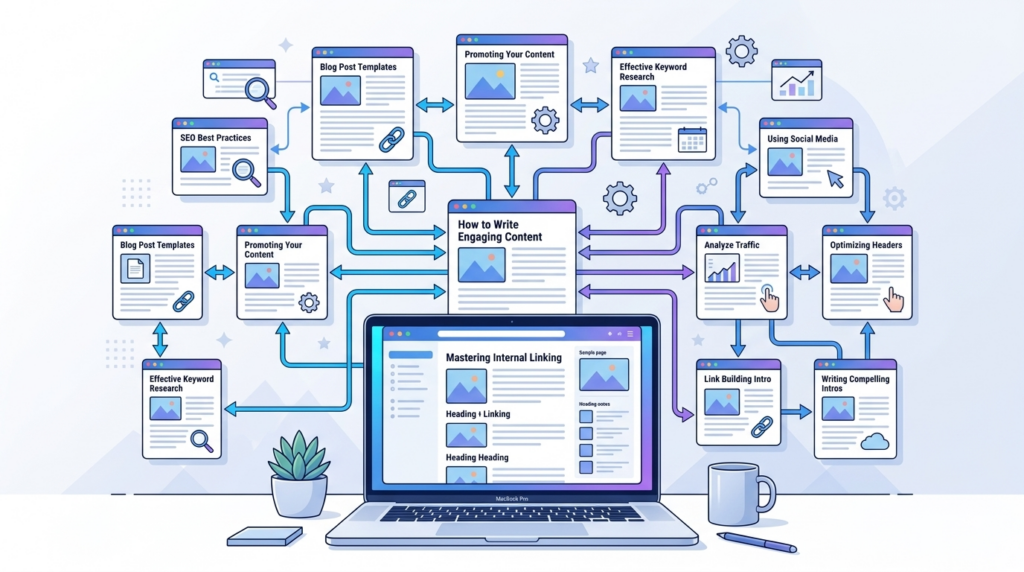
This creates a strong network of content.
Common Internal Linking Mistakes Bloggers Make
Even though internal linking is simple, many bloggers make mistakes that reduce its effectiveness.
Here are some common ones I have seen.
Linking Too Little
Some bloggers write great articles but add only one or two internal links.
This makes it harder for readers and search engines to navigate the site.
Linking Too Much
On the other hand, some articles contain too many links, which can overwhelm readers.
The goal is balance.
Links should feel natural and helpful.
Using Generic Anchor Text
Anchor text like:
- Click here
- Read more
does not help search engines understand your content.
Descriptive anchor text works much better.
Ignoring Older Articles
Many bloggers focus only on new content.
But older posts are valuable assets.
Updating them with new internal links can significantly improve your site.
Linking to Irrelevant Pages
Every internal link should make sense in context.
If the link feels forced, it can confuse readers.
Always prioritize relevance.
Tools That Help With Internal Linking
As your blog grows, managing internal links manually can become difficult.
Here are a few tools I personally find useful.
Google Search Console
Google Search Console helps you see which pages already receive traffic.
These pages are perfect candidates for adding links to other articles.
SEO Plugins
If you use WordPress, several SEO plugins suggest internal links automatically.
Examples include:
- Yoast SEO
- Rank Math
These tools analyze your content and recommend related pages you can link to.
Site Search
Sometimes I simply search my own website using Google.
For example, I type:
site:mywebsite.com blogging tips
This shows all pages related to blogging tips, making it easy to find linking opportunities.
How Internal Linking Improved My Blog
One of the biggest lessons I learned in blogging is that content alone is not enough. Structure matters just as much.
When I began improving internal linking across my websites, I noticed several positive changes:
- Articles started ranking faster
- Readers visited more pages per session
- My website became easier to navigate
- Older posts started getting traffic again
Internal linking turned my blog from a collection of separate articles into a connected knowledge hub.
Conclusion
Internal linking is one of the most overlooked strategies in blogging, yet it is incredibly powerful.
The best part is that it doesn’t require expensive tools or advanced technical skills. Any blogger can start using it today.
From my experience as a digital creator and website developer, a good internal linking strategy should focus on three things:
- Helping readers discover more useful content
- Helping search engines understand your website structure
- Strengthening your most important pages
Start simple.
Whenever you publish a new article, link it to related posts. Then go back to older articles and connect them to the new content.
Over time, your blog will grow into a well-organized network of information where every article supports the others.
And in the long run, that structure can make a huge difference in how your website performs.
If you consistently apply internal linking across your content, you won’t just build a blog you’ll build a powerful knowledge platform that keeps readers coming back for more.